
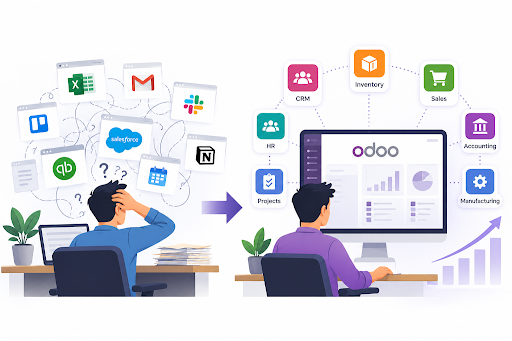
Business growth often brings an unexpected challenge: managing multiple software tools without creating operational bottlenecks. Companies may rely on separate applications for sales, inventory, accounting, and customer management, making it difficult to maintain consistent information across departments. As operations expand, employees spend more time switching between systems, updating records, and reconciling data instead of focusing on business priorities.
In this situation, odoo ai integration can be relevant for businesses exploring ways to connect intelligent automation with their existing workflows. However, simplifying operations requires more than introducing new technology; businesses must also identify process gaps, establish clear requirements, and ensure their systems work together effectively.
Why Too Many Business Tools Become an Operational Problem
Using different software tools for individual business functions may seem manageable initially, but complexity increases as operations expand. Sales teams might maintain customer records in one application while inventory teams track stock elsewhere, leaving finance staff to reconcile information from multiple sources. These disconnected business systems create gaps in communication and make it harder to maintain accurate, up-to-date records.
The problem extends beyond managing multiple logins. Employees may need to enter the same information repeatedly, manually transfer data between applications, or investigate inconsistencies before preparing reports. These tasks consume valuable time and increase the risk of human error.
Software fragmentation can also affect decision-making. Without a clear view of sales performance, inventory levels, outstanding payments, and purchasing activity, managers may struggle to identify problems early. As a business grows, these limitations can become expensive and difficult to manage. Rather than adding another tool whenever a new requirement emerges, businesses should evaluate whether their existing systems can work together through effective business software integration.
How Odoo ERP Brings Business Operations Together
Instead of managing every department through a separate platform, businesses can use Odoo ERP to connect essential functions within a shared system. Its modular structure allows companies to select applications for sales, inventory, accounting, purchasing, and other operational needs, helping teams work with more consistent information.
For example, when a sales order is confirmed, the relevant inventory and delivery processes can be coordinated through the appropriate Odoo applications. Similarly, connecting invoicing with accounting helps finance teams maintain clearer records of business transactions. These workflows reduce unnecessary data duplication and make information easier to access across departments.
Another advantage is flexibility. Businesses can begin with the applications they need most and introduce additional functionality as their operations evolve. However, the benefits depend on proper configuration, reliable data, and workflows that reflect actual business requirements.
For growing companies, this integrated approach can provide a more manageable foundation for daily operations without requiring every department to work independently.
Five Ways Odoo ERP Simplifies Growing Operations
1. Connecting Sales and Customer Management
When customer information, sales orders, and follow-ups are scattered across different applications, sales teams can struggle to maintain a clear view of each opportunity. Odoo brings customer relationship management and sales workflows closer together, helping teams track leads, manage quotations, and coordinate customer interactions. Businesses exploring odoo crm development can also consider how CRM functionality fits into their wider operational requirements.
2. Improving Inventory and Purchasing Visibility
Managing stock becomes more complicated as product ranges, suppliers, and order volumes increase. Odoo’s inventory and purchasing applications help businesses monitor stock movements, manage purchase orders, and coordinate replenishment. With appropriately configured workflows, teams can make better-informed purchasing decisions and reduce the risk of stock discrepancies.
3. Reducing Repetitive Administrative Work
Manual data entry and repetitive approvals can consume valuable working hours. Odoo supports configurable workflows and automation that can reduce unnecessary manual steps across selected business processes. The objective is not to automate everything, but to identify repetitive tasks where automation improves consistency and allows employees to focus on more valuable work.
4. Maintaining Better Financial Visibility
When financial records are disconnected from sales and purchasing activities, reconciling transactions and preparing reports can become time-consuming. Connecting these functions helps businesses maintain more consistent records of invoices, payments, and expenses. This can improve financial visibility and help managers make decisions using more up-to-date information.
5. Adapting Operations as the Business Expands
A growing company may eventually need new approval processes, additional reporting capabilities, or workflows tailored to its industry. Odoo’s modular structure allows businesses to extend their system as requirements change. Where standard functionality is insufficient, customization of odoo erp can help align workflows with specific operational needs without introducing another disconnected application.
Where AI and Automation Fit into Connected Business Operations
As businesses grow, repetitive tasks such as processing documents, updating records, and retrieving information can place additional pressure on employees. Integrating automation into existing workflows can reduce manual effort, improve consistency, and help teams focus on more important operational decisions.
Odoo provides automation capabilities across selected business processes, while AI functionality may require additional tools, integrations, or configuration depending on the intended use case. For example, businesses might explore AI-assisted document processing, automated information retrieval, or intelligent support for routine workflows. Successful implementation depends on data quality, system compatibility, and clearly defined business requirements.
Businesses considering odoo ai integration should first identify where AI can deliver measurable value rather than adopting it simply because the technology is available. A targeted approach helps organizations introduce useful capabilities without adding unnecessary complexity to their software environment.
What Businesses Should Consider Before Implementing Odoo ERP
Although Odoo ERP can help simplify business operations, successful implementation requires a clear understanding of existing processes and future requirements. Businesses should begin by identifying operational bottlenecks, such as duplicated data entry, disconnected applications, or delays in reporting. This assessment helps determine which Odoo applications and integrations will deliver the most value.
Data migration is another important consideration. Existing customer records, financial information, and inventory data must be reviewed and transferred carefully to maintain accuracy. Employee training also matters because even a well-configured system may fail to deliver its intended benefits if teams struggle to use it effectively.
Choosing the right odoo erp implementation company can help businesses plan deployment, configure relevant workflows, and address integration requirements. A phased implementation approach can further reduce disruption by allowing teams to adopt essential functions before expanding the system to additional departments.
Conclusion: Simplify Systems Before Adding More
Managing business growth does not have to mean adding more software tools and increasing operational complexity. By connecting essential functions, improving data visibility, and automating repetitive tasks, Odoo ERP can help businesses establish more coordinated workflows. However, the results depend on choosing the right applications, planning integrations carefully, and adapting the system to actual business needs.
Companies evaluating their next stage of growth should focus on building a connected, scalable software environment. With the right ERP strategy, businesses can simplify everyday operations while creating a stronger foundation for future expansion.
